Create a subscription for each council, utility or other service your Payreq Group account should receive documents from.
Before you subscribe
Complete whatever process the issuing organisation requires to record your business as the authorised recipient for that property or account. Most organisations need this in writing, and many ask for a copy of the management agreement or a signed authority form.
That step is not administrative box-ticking. The property owner has to have agreed that you can receive their mail, and the organisation needs that on record. It is the reason Payreq cannot simply let you add any property you like.
Subscribe
- Sign in at go.payreq.com and select the correct Payreq Group account.
- Open Subscriptions and select Subscribe.
- Search for and select the service.
- Choose Payreq MyBills Agent, which is the current interface label for the Payreq Group delivery option.
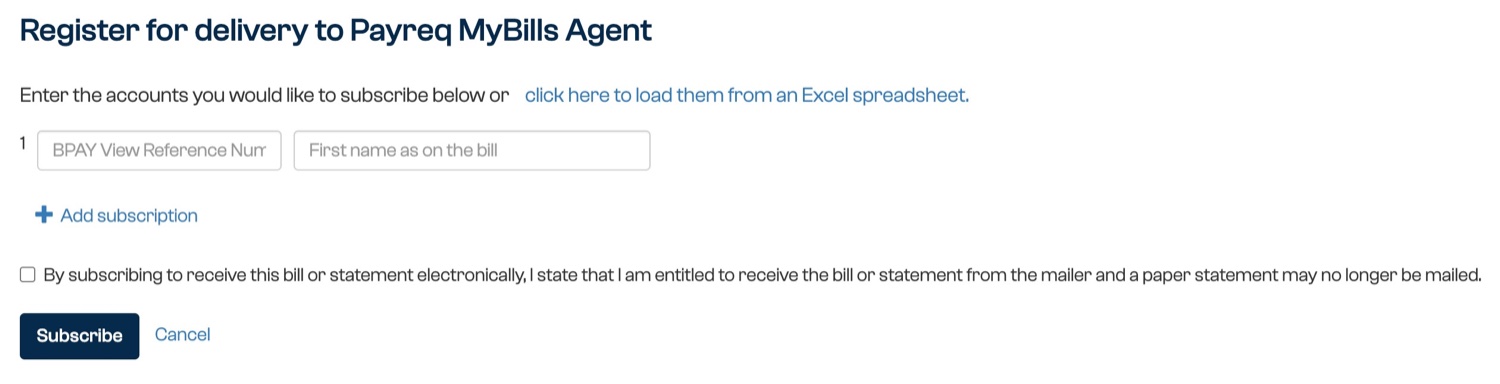
- For one property or account, enter the requested verification details and select Subscribe.
- For multiple properties or accounts, select the link to load them from an Excel spreadsheet. Prepare the two columns named in the dialog, copy the rows from your spreadsheet, paste them into the box and select Load.
- Accept the terms and submit the request.
- Complete any email verification or approval instructions.
The issuing organisation may review the request before it takes effect.
Check a bulk upload
After loading and submitting several accounts, check the subscription status and any error report returned. Correct only the rows that failed, using the account details exactly as the issuing organisation holds them. The required columns and verification fields vary by service, so follow the headings shown on the current screen rather than reusing another organisation's spreadsheet.
If you cannot add a property
Some organisations maintain your subscriptions for you from their own customer records. Where you have authorised that arrangement, the option to subscribe is not available and Payreq directs you to contact the organisation instead. The wording and contact route can vary by service.
This is expected, not a fault. To add a property in that situation:
- Tell the issuing organisation that you are the authorised recipient for the property, using their required process.
- Wait for them to update their records.
- The subscription is created the next time their records are updated in Payreq.
Allow for their billing cycle. If they issue notices quarterly, a change you notify in April may not appear until the notices go out in July. If a document is overdue and the subscription still has not appeared, contact the organisation rather than Payreq, since their records are what create it.
Related guides
Was this article helpful?
That’s Great!
Thank you for your feedback
Sorry! We couldn't be helpful
Thank you for your feedback
Feedback sent
We appreciate your effort and will try to fix the article