Card payment is available only when the issuing organisation has enabled it for the bill.
- Sign in at go.payreq.com.
- Open the Inbox and select the bill.
- Select Pay Now. If this option is not shown, the bill cannot be paid by card through Payreq.
- Choose from the payment amounts offered for that bill, then continue.
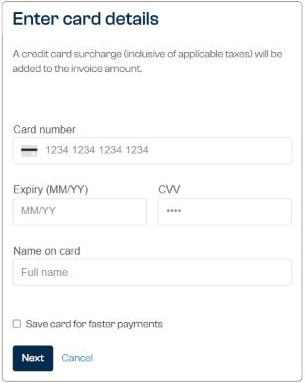
- Enter or select your card details.
- Review the payment amount, card details and any surcharge shown.
- Select Pay Now once to submit the payment.
- Wait for the result before closing the page or trying again.

Payreq shows whether the payment was successful or failed. Keep the result for your records. If the result is unclear, wait and check Payments before trying again so you do not submit the payment twice.
Contact the issuing organisation about the amount due or how a payment is applied. Contact Payreq Support if the Payreq payment page returns an error or the result remains unclear.
Was this article helpful?
That’s Great!
Thank you for your feedback
Sorry! We couldn't be helpful
Thank you for your feedback
Feedback sent
We appreciate your effort and will try to fix the article