Create a subscription when you want a participating organisation to send documents to your Payreq Mailbox, email address or another available destination.
Before you start
Have a recent document from the organisation available. It may contain the account number, employee number, customer name or other details needed to verify your request.
Create a subscription
- Sign in at go.payreq.com.
- Open Subscriptions.
- Select Subscribe.
- Search for and select the organisation or service.
- Choose one of the delivery methods offered.
- Enter the requested verification and contact details exactly as they appear in the organisation's records.
- Read and accept the terms, then select Subscribe.
- Complete any verification instructions sent to you by email.

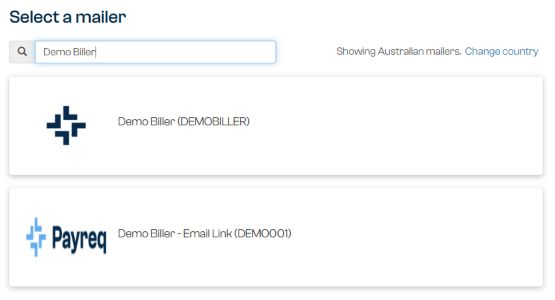
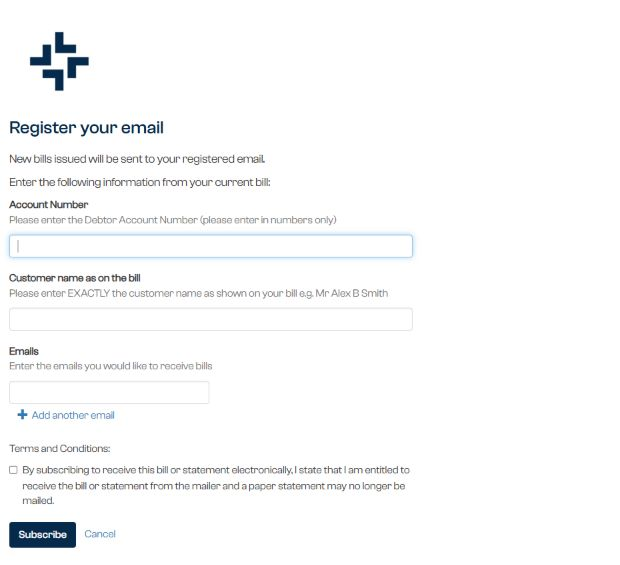
Your request may remain pending while the organisation reviews it. Follow any confirmation or verification instructions sent to you.
Review an existing subscription
Open Subscriptions, select the organisation, then select the subscription you want to review. The page shows its current details and status. The verification details are not generally editable after approval. Available actions depend on the service and delivery method, and may include managing registered email addresses or unsubscribing.
If the request fails, check the information against a recent document before trying again. Contact the issuing organisation if its records need to be corrected.
Was this article helpful?
That’s Great!
Thank you for your feedback
Sorry! We couldn't be helpful
Thank you for your feedback
Feedback sent
We appreciate your effort and will try to fix the article